DIY digital weight scale using ESP32 and HX711 module
Tutorial plan
1- Objective of the project
2- Required Components
3- Circuit Connections of system
4- Micropython program of ESP32 Weight Scale
Objective of the project
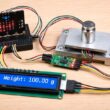
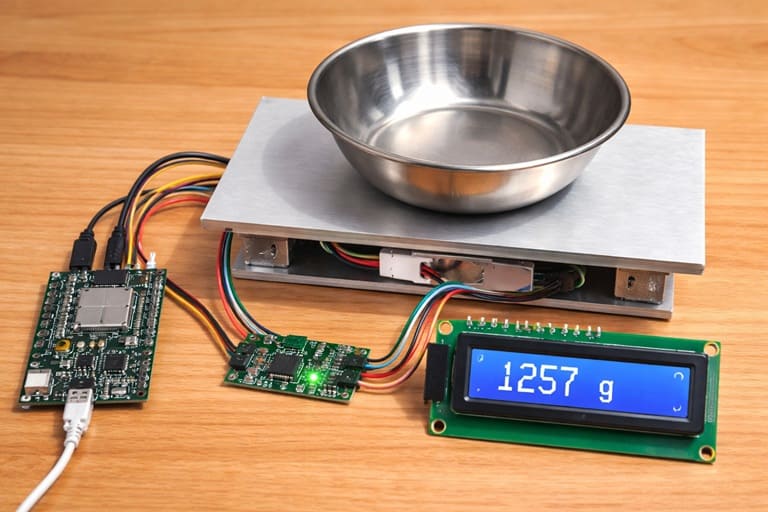
The objective of this project is to design and build a low-cost and accurate digital weight scale using an ESP32 board, an HX711 amplifier module, a load cell sensor, and an LCD I2C display. This project demonstrates how electronic weighing systems work by combining a sensor, a signal amplifier, and a microcontroller. It helps students and beginners understand sensor interfacing, analog-to-digital conversion, and real-time data display. The system can be used as a learning tool for embedded systems and practical electronics applications.
Functioning of the System
The system works by converting physical weight into an electrical signal and then into a readable digital value. When an object is placed on the load cell platform, the load cell slightly deforms. This deformation changes the internal resistance of the strain gauges inside the load cell, generating a very small analog voltage signal proportional to the applied weight.
Because this signal is extremely small (in millivolts), it cannot be read directly by the ESP32. The HX711 module is used to amplify this weak signal and convert it into a digital value using its built-in analog-to-digital converter (ADC). The amplified digital data is then transmitted to the ESP32.
The ESP32 processes the received data, applies calibration factors to convert the raw value into weight units (such as grams or kilograms), and calculates the final weight measurement. Finally, the measured weight is displayed clearly on the LCD I2C screen, allowing the user to read the result in real time.
Required Components
1. ESP32 board
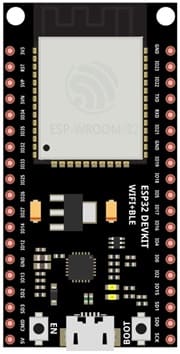
The ESP32 board is the main microcontroller of the system. It reads digital data from the HX711 module, processes the values, applies calibration, and controls the LCD display. The ESP32 is powerful, fast, and suitable for real-time sensor applications.
2. Load cell sensor
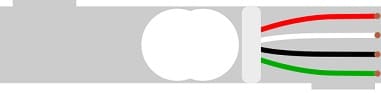
The load cell sensor is the component responsible for measuring weight. It works using strain gauges that change resistance when pressure or weight is applied. When an object is placed on the platform, the load cell slightly deforms and produces a very small analog voltage proportional to the weight.
3. HX711 amplifier module
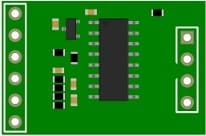
The HX711 module is a precision 24-bit analog-to-digital converter (ADC) specially designed for weight measurement systems. Since the signal generated by the load cell is extremely small (in millivolts), the HX711 amplifies this weak signal and converts it into digital data that the ESP32 can read accurately.
4. LCD Display with I2C Module

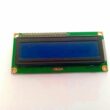
The LCD I2C display is used to show the measured weight. It receives data from the ESP32 board and displays the weight value in real time.
5. Breadboard
A breadboard is used to assemble the circuit without soldering. It makes it easy to connect and modify the components during testing and development.
6. Jumper Wires

Jumper wires are used to connect the ESP32 board, HX711 module, load cell, and LCD display together. They ensure proper electrical connections between all components.
Circuit Connections of system

1- Connection of Load cell sensor to HX711 module
| Load cell sensor | HX711 module |
|---|---|
| Red | E+ |
| Black | E- |
| White | A- |
| Green | A+ |
2- Connection of HX711 module to ESP32 board
| HX711 | ESP32 |
|---|---|
| VCC | 5V |
| GND | GND |
| DT | GPIO 19 |
| SCK | GPIO 18 |
3- Connection of LCD I2C display to ESP32 board
| LCD I2C display | ESP32 board |
|---|---|
| VCC | 5V |
| GND | GND |
| SDA | GPIO 21 |
| SCL | GPIO 22 |
Micropython program of ESP32 Weight Scale
This MicroPython program implements a digital weight scale system using an ESP32, an HX711 load cell amplifier, and an LCD I2C display. The program reads weight data from a load cell sensor, processes it using calibration values, and displays the measured weight in grams on the LCD screen.
You need to install this libraries :
i2c_lcd et lcd_api for I2C LCD screen
hx711 for HX711 module
|
1 2 3 4 5 6 7 8 9 10 11 12 13 14 15 16 17 18 19 20 21 22 23 24 25 26 27 28 29 30 31 32 33 34 35 36 37 38 39 40 41 42 43 44 45 46 47 48 49 50 51 52 53 54 55 56 57 58 59 60 61 62 63 64 65 66 67 68 69 70 71 72 73 |
# Import the Pin class to control ESP32 GPIO pins # Import the I2C class for communication with I2C devices from machine import Pin, I2C # Import the library to control the I2C LCD display from i2c_lcd import I2cLcd # Import the time module to use delays import time # Import the HX711 library to read data from the load cell from hx711 import HX711 # ===================================== # LCD I2C CONFIGURATION # ===================================== # I2C address of the LCD display (commonly 0x27 or 0x3F) I2C_ADDR = 0x27 # Initialize the I2C bus # I2C(0) -> use I2C bus number 0 of the ESP32 # scl=Pin(22) -> connect LCD SCL pin to GPIO 22 # sda=Pin(21) -> connect LCD SDA pin to GPIO 21 # 4, 20 -> LCD with 4 rows and 20 columns lcd = I2cLcd(I2C(0, scl=Pin(22), sda=Pin(21)), I2C_ADDR, 4, 20) # Clear the LCD screen lcd.clear() # Display a startup message on the first line lcd.putstr("ESP32 Balance") # ===================================== # HX711 MODULE CONFIGURATION # ===================================== # Initialize the HX711 module # d_out=19 -> DT pin connected to GPIO 19 # pd_sck=18 -> SCK pin connected to GPIO 18 driver = HX711(d_out=19, pd_sck=18) # ===================================== # MAIN LOOP # ===================================== while True: # Read the raw value sent by the HX711 module # Apply a calibration formula to convert the raw value into weight (grams) # 183200 -> offset value (tare) # 238 -> calibration factor # -47 -> correction value to improve accuracy # abs() -> ensures the result is positive poids = abs(183200 - driver.read()) / 238 - 47 # Move the cursor to the beginning of the second line (column 0, row 1) lcd.move_to(0, 1) # Clear the second line by writing spaces lcd.putstr(" ") # Move the cursor again to the beginning of the second line lcd.move_to(0, 1) # Display the weight with 2 decimal places lcd.putstr("Weight= " + str(round(poids, 2)) + " g") # Wait 1 second before the next measurement time.sleep(1) |
1 comment

Cheap Private Proxies 05-08-2626
Hello would you mind letting me know which web host you're using? I've loaded your blog in 3 different web browsers and I must say this blog loads a lot faster then most. Can you recommend a good hosting provider at a reasonable price? Many thanks, I appreciate it!
Leave a comment
Passion for robotics

Recent tutorials





Robotics workshop

Polpular tutorials





Making robots

Most commented tutorials




Robotic arm

Categories
Smart Home