Intelligent Trash Bin Powered by Arduino UNO
Tutorial plan
1- Objective of the project
2- Required Components
3- Circuit Connections of system
4- Arduino program
Objective of the project
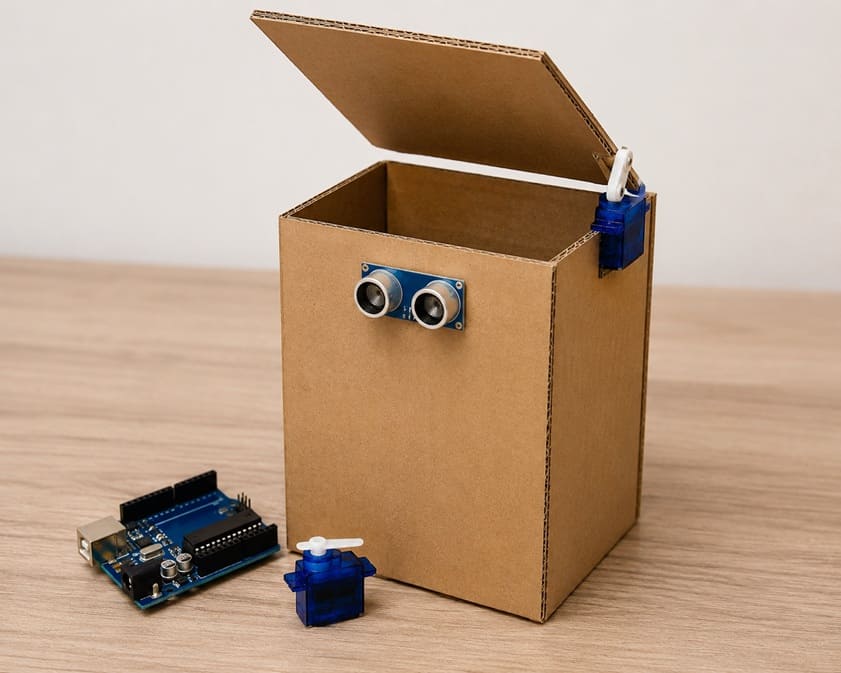
The objective of this project is to design and build an intelligent trash bin that opens and closes its lid automatically without physical contact.
The system uses an Arduino UNO, an HC-SR04 ultrasonic sensor, and an SG90 servo motor to improve hygiene and make waste disposal more convenient.
Operation (Functioning)
The HC-SR04 ultrasonic sensor is installed on the top of the trash bin to detect the presence of a hand or an object approaching the lid. The sensor continuously measures the distance between the bin and nearby objects.
When an object is detected within a predefined distance, the Arduino UNO processes the sensor data and sends a control signal to the SG90 servo motor. The servo motor then rotates to open the lid automatically.
After a short delay, allowing the user to dispose of the waste, the Arduino UNO commands the servo motor to return to its initial position, closing the lid. The process is repeated each time an object is detected near the sensor.
This automatic operation makes the trash bin more hygienic, practical, and user-friendly by eliminating the need to touch the lid.
Required Components
1. Arduino UNO
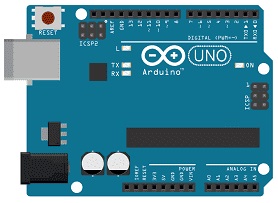
The Arduino UNO is the main control unit of the intelligent trash bin. It receives distance measurements from the HC-SR04 ultrasonic sensor, processes the data, and sends commands to the SG90 servomotor to open or close the lid.
2. HC-SR04 sensor
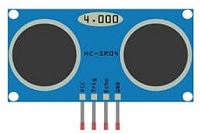
The HC-SR04 is used to detect the presence of a hand or an object near the trash bin. It emits ultrasonic waves and measures the time taken for the echo to return, allowing it to calculate the distance between the sensor and the detected object.
3. Servo motor
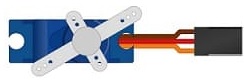
The SG90 servomotor is responsible for moving the trash bin lid. It receives control signals from the Arduino UNO and rotates to a specific angle to open the lid. After a short delay, it returns to its original position to close the lid.
4. Jumper Wires

Jumper wires are used to establish electrical connections between the Arduino UNO board, the HC-SR04 sensor and the servo motor.
Circuit Connections of system
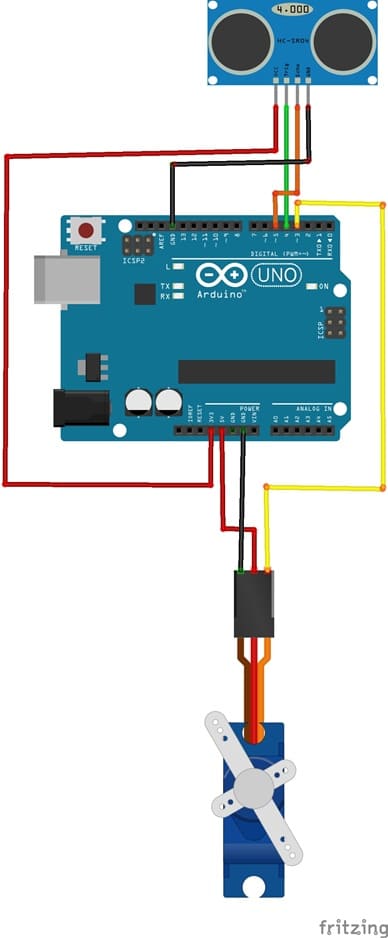
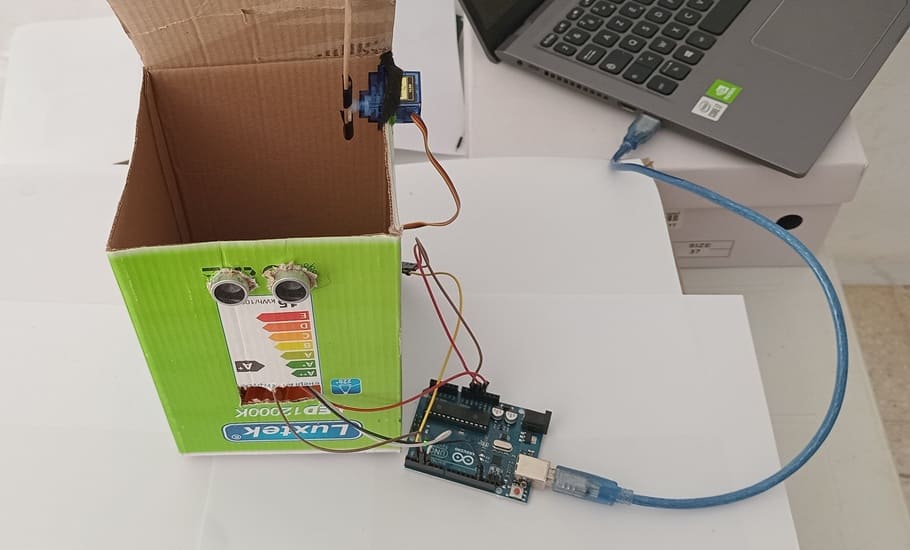
1- Connection of HC-SR04 sensor to Arduino UNO
| HC-SR04 sensor | Arduino UNO |
|---|---|
| VCC | 3V |
| GND | GND |
| Trig | D4 |
| Echo | D3 |
2- Connection of servo motor to Arduino UNO
| Servo motor | Arduino UNO |
|---|---|
| red wire (+) | 5V |
| Brown wire (-) | GND |
| Yellow wire (S) | D2 |
Arduino program
This Arduino program controls an intelligent trash bin using an HC-SR04 ultrasonic sensor and an SG90 servomotor.
You must install this library : Ultrasonic for HC-SR04 sensor
|
1 2 3 4 5 6 7 8 9 10 11 12 13 14 15 16 17 18 19 20 21 22 23 24 25 26 27 28 29 30 31 32 33 34 35 36 37 38 39 40 41 42 43 44 45 46 47 48 49 50 51 52 53 54 55 56 57 58 59 60 61 62 63 64 65 66 67 68 |
// ====================================================== // Import required libraries // ====================================================== #include "Ultrasonic.h" // Library for the HC-SR04 ultrasonic sensor #include <Servo.h> // Library for the servo motor // ====================================================== // Component declaration and initialization // ====================================================== // Create the ultrasonic sensor object // Trig pin connected to D4 and Echo pin to D3 Ultrasonic ultrasonic(4, 3); // Create the servo motor object Servo myservo; // Variable to store the servo position int pos = 0; // ====================================================== // Setup function // ====================================================== void setup() { // Initialize serial communication // to display distance measurements on the Serial Monitor Serial.begin(9600); // Attach the servo motor to pin D2 myservo.attach(2); // Initially close the lid (0° position) myservo.write(0); } // ====================================================== // Main loop // ====================================================== void loop() { // Measure the distance in centimeters int distance = ultrasonic.Ranging(CM); // Display the measured distance Serial.print("distance = "); Serial.print(distance); Serial.println(" cm"); // If an object is detected closer than 3 cm if (distance < 3) { // Open the lid (rotate the servo to 90°) myservo.write(90); // Keep the lid open for 3 seconds delay(3000); } else { // No nearby object detected: // close the lid (return to 0°) myservo.write(0); } // Short delay before the next measurement delay(300); } |
Explanation of the program
At startup, the Arduino UNO initializes serial communication and sets the servomotor to the closed position (0°). The ultrasonic sensor continuously measures the distance between the trash bin and any nearby object.
When a hand or an object is detected at a distance of less than 3 cm, the Arduino UNO sends a command to the SG90 servomotor to rotate to 90°, automatically opening the lid of the trash bin. The lid remains open for 3 seconds to allow the user to dispose of waste.
If no object is detected within the specified distance, the servomotor returns to 0°, keeping the lid closed. The process is repeated continuously, allowing the trash bin to operate automatically without physical contact.
This program provides a simple and hygienic solution for automatic waste disposal by combining distance detection and servo motor control.
0 comment
Leave a comment
Passion for robotics

Recent tutorials





Robotics workshop

Polpular tutorials





Making robots

Most commented tutorials




Robotic arm

Categories
Smart Home