Intelligent Water Tap Control System with ESP8266 NodeMCU
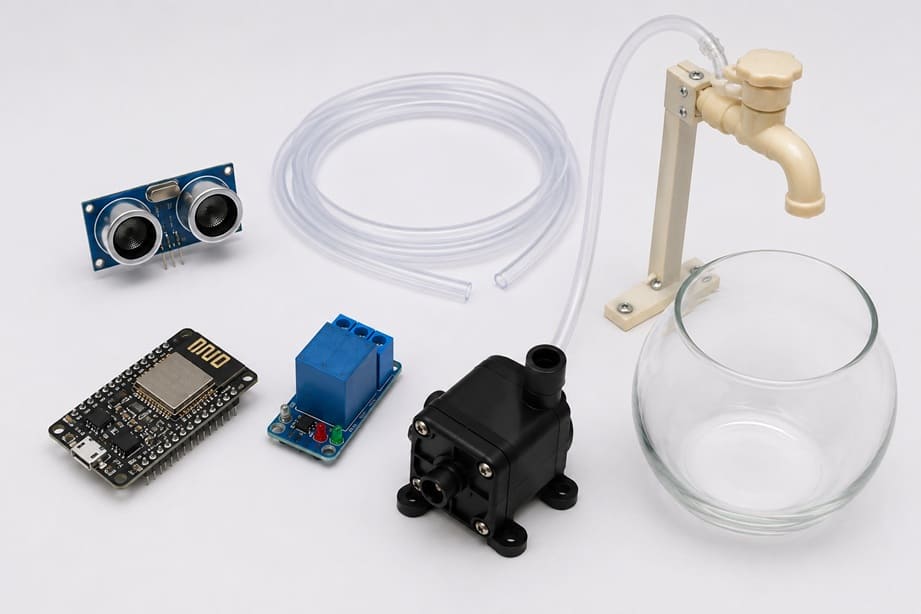
Tutorial plan
1- Objective of the project
2- Required Components
3- Circuit Connections of system
4- MicroPython program for ESP8266 NodeMCU
Objective of the project
The objective of this project is to design and implement an intelligent water tap control system that can automatically dispense water without physical contact. The system uses an ESP8266 NodeMCU microcontroller, an HC-SR04 ultrasonic sensor, a relay module, and a 12V water pump to detect the presence of a user's hand and control the water flow accordingly.
This project aims to improve hygiene by eliminating the need to touch the tap, reduce water wastage by supplying water only when needed, and demonstrate the integration of sensors, actuators, and microcontroller-based automation. Furthermore, the Wi-Fi capability of the ESP8266 allows future expansion toward Internet of Things (IoT) applications such as remote monitoring and control.
Functioning of the Intelligent Water Tap Control System
The system operates by continuously monitoring the area in front of the tap using the HC-SR04 ultrasonic sensor. The sensor emits ultrasonic waves and measures the time required for the reflected waves to return after hitting an object. Using this information, it calculates the distance between the sensor and the object.
When a user's hand is placed within a predefined distance (for example, less than 6 cm), the HC-SR04 detects its presence and sends the distance measurement to the ESP8266 NodeMCU. The microcontroller processes this information and determines whether the detected distance is below the activation threshold.
If the measured distance is less than the specified threshold, the ESP8266 activates the relay module. The relay acts as an electrically controlled switch that connects the power supply to the 12V water pump. Once energized, the pump draws water from the reservoir and delivers it through the outlet, allowing water to flow automatically.
When the user's hand is removed and the detected distance becomes greater than the threshold value, the ESP8266 deactivates the relay. As a result, the relay disconnects the pump from the power supply, stopping the water flow immediately.
The entire process is repeated continuously in a loop, ensuring real-time detection and automatic control of water dispensing. This enables a touch-free, efficient, and user-friendly water tap system.
Required Components
1. ESP8266 NodeMCU Board
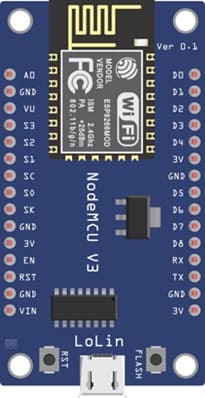
The ESP8266 NodeMCU is a low-cost microcontroller development board with built-in Wi-Fi connectivity. It serves as the main controller of the intelligent water tap system. The board receives distance measurements from the HC-SR04 ultrasonic sensor, processes the data, and controls the relay module accordingly. Its Wi-Fi capability also enables future integration with Internet of Things (IoT) applications, allowing remote monitoring and control of the system.
2. HC-SR04 sensor
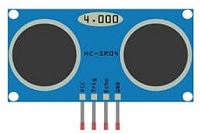
The HC-SR04 is an ultrasonic distance sensor used to detect the presence of a user's hand near the water tap. It operates by transmitting ultrasonic sound waves and measuring the time taken for the reflected waves to return. Based on this time, the sensor calculates the distance between itself and the detected object. In this project, the sensor acts as the input device that triggers the automatic operation of the water tap.
3. Relay module
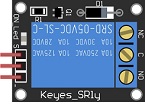
The relay module is an electrically operated switch that allows the low-voltage ESP8266 to control the higher-voltage 12V water pump safely. When the ESP8266 sends a control signal to the relay, the relay either closes or opens its contacts, thereby turning the pump on or off. The relay provides electrical isolation between the control circuit and the power circuit, ensuring safe operation.
4. 12 V Water Pump
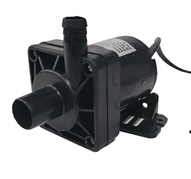
The 12V water pump is the actuator responsible for moving water from the reservoir to the tap outlet. When powered through the relay module, the pump generates sufficient pressure to circulate water through the tubing. The pump operates only when a hand is detected by the sensor, helping to conserve water and energy.
5. Jumper Wires

These wires are used to connect the ESP8266 NodeMCU, the HC-SR04 sensor, and the relay module together.
6. Breadboard:
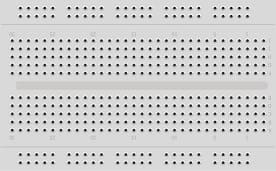
The breadboard allows the electronic components to be connected and tested without soldering.
Circuit Connections of system
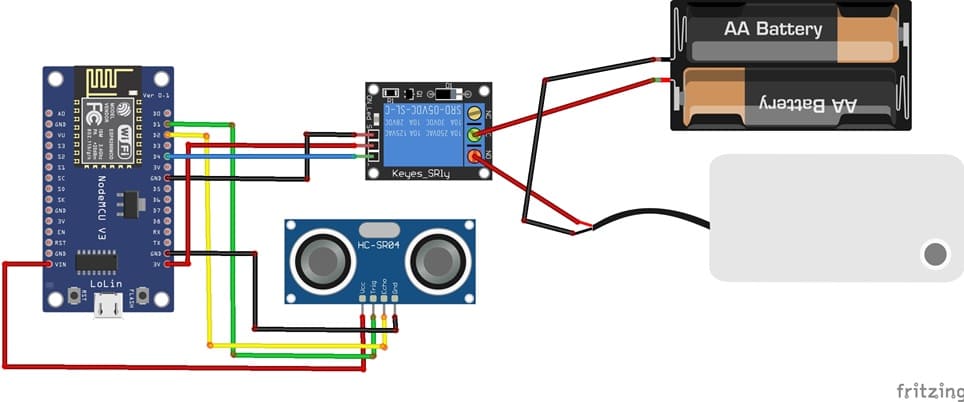
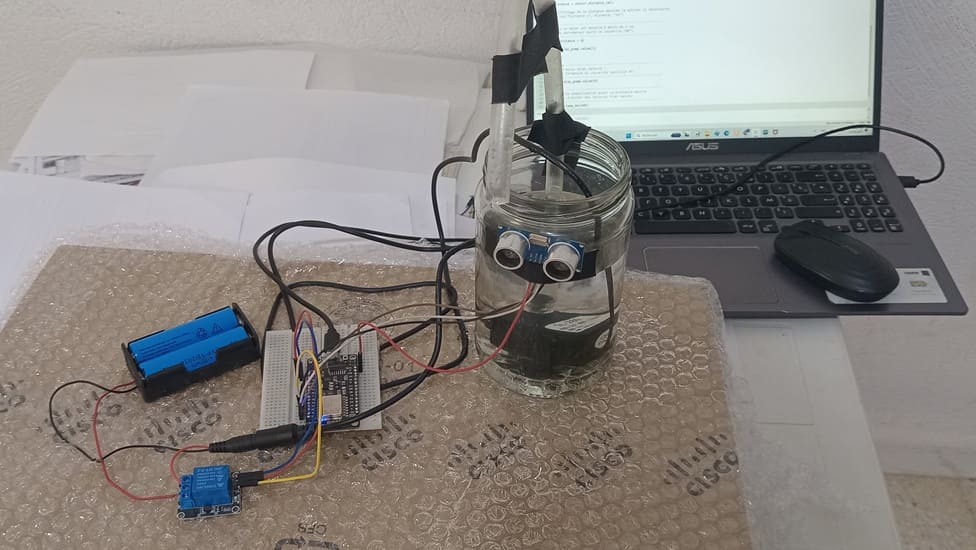
1- Connection of HC-SR04 sensor to ESP8266 NodeMCU
| HC-SR04 sensor | ESP8266 NodeMCU |
|---|---|
| VCC | 5V |
| GND | GND |
| Trig | D1 |
| Echo | D2 |
2- Connection of relay module to ESP8266 NodeMCU
| Relay Module | ESP8266 NodeMCU |
|---|---|
| Positive pin (+) | 3V |
| Negative pin (-) | GND |
| pin (S) | D4 |
3- Connecion of water pump
| Red wire (+) | NO pin (Relay module) |
| Black wire (-) | Negative terminal (two 3.7V coils) |
4- Connection of two 3.7V coils to relay module
| two 3.7V coils | Relay Module |
|---|---|
| Red wire (+) | COM pin |
MicroPython program for ESP8266 NodeMCU
This MicroPython program controls an automatic water tap using an ESP8266 NodeMCU, an HC-SR04 ultrasonic sensor, a relay module, and a 12 V water pump. Its purpose is to detect a hand, glass, or container near the sensor and automatically start the pump to supply water.
You must install this library : hc-sr04 for HC-SR04 sensor
|
1 2 3 4 5 6 7 8 9 10 11 12 13 14 15 16 17 18 19 20 21 22 23 24 25 26 27 28 29 30 31 32 33 34 35 36 37 38 39 40 41 42 43 44 45 46 47 48 49 50 51 52 53 54 55 56 57 58 59 60 61 62 63 64 65 |
# ========================================================== # Import necessary libraries # ========================================================== import machine from machine import Pin, SoftI2C from hcsr04 import HCSR04 # HC-SR04 ultrasonic sensor library import time # Time delay management # ========================================================== # Initialize the HC-SR04 ultrasonic sensor # trigger_pin : pin that sends the ultrasonic pulse # echo_pin : pin that receives the reflected echo # echo_timeout_us : maximum waiting time for the echo signal # ========================================================== sensor = HCSR04( trigger_pin=5, echo_pin=4, echo_timeout_us=1000000 ) # ========================================================== # Initialize the relay module controlling the water pump # GPIO2 : digital output connected to the relay input # At startup, the pump is turned OFF (relay deactivated) # ========================================================== relay_pump = Pin(2, Pin.OUT) # ========================================================== # Main system loop # ========================================================== while True: # ------------------------------------------------------ # Measure the distance between the HC-SR04 sensor # and the user's hand placed in front of the water tap # ------------------------------------------------------ distance = sensor.distance_cm() # Display the measured distance (optional) # Useful for testing and debugging the sensor # print("Distance =", distance, "cm") # ------------------------------------------------------ # If a hand is detected within 6 cm, # the ESP8266 activates the relay to start # the water pump and allow water to flow. # ------------------------------------------------------ if distance < 6: relay_pump.value(1) # Activate relay → Pump ON else: # -------------------------------------------------- # No hand detected: # stop the water pump to save water. # -------------------------------------------------- relay_pump.value(0) # Deactivate relay → Pump OFF # ------------------------------------------------------ # Wait 500 ms before the next measurement. # This delay prevents excessive readings and # ensures stable system operation. # ------------------------------------------------------ time.sleep_ms(500) |
Program Description
At the beginning of the program, the required libraries are imported. The machine library provides access to the hardware features of the ESP8266, such as digital input and output pins. The HCSR04 library is used to communicate with the HC-SR04 ultrasonic sensor, while the time library is used to create delays between measurements.
Next, the HC-SR04 ultrasonic sensor is initialized. The sensor is connected to two pins of the ESP8266: the trigger pin, which sends ultrasonic waves, and the echo pin, which receives the reflected waves. By measuring the time taken for the ultrasonic signal to return after hitting an object, the sensor can accurately calculate the distance between itself and the object.
The relay module is then configured as an output device using GPIO2 of the ESP8266. The relay acts as an electronic switch that allows the low-voltage ESP8266 to control the 12V water pump safely. When the relay is activated, electrical power is supplied to the pump, causing water to flow. When the relay is deactivated, the pump stops operating.
After initialization, the program enters an infinite loop that runs continuously as long as the system is powered. During each cycle, the ultrasonic sensor measures the distance between the sensor and any object located in front of the tap. The measured value is stored in the variable distance.
The program then compares the measured distance with a predefined threshold value of 6 centimeters. If the distance is less than 6 cm, the program assumes that a user's hand is present near the tap. In response, the ESP8266 sends a signal to activate the relay module. The relay closes its contacts, powering the 12V water pump, which draws water from the reservoir and delivers it through the tap.
If the measured distance is greater than or equal to 6 cm, the program determines that no hand is present. The ESP8266 then deactivates the relay module, cutting off power to the water pump. As a result, the water flow stops automatically.
At the end of each cycle, the program waits for 500 milliseconds before taking another measurement. This short delay prevents excessive sensor readings, improves system stability, and reduces unnecessary processing by the microcontroller.
0 comment
Leave a comment
Passion for robotics

Recent tutorials





Robotics workshop

Polpular tutorials





Making robots

Most commented tutorials




Robotic arm

Categories
Smart Home